
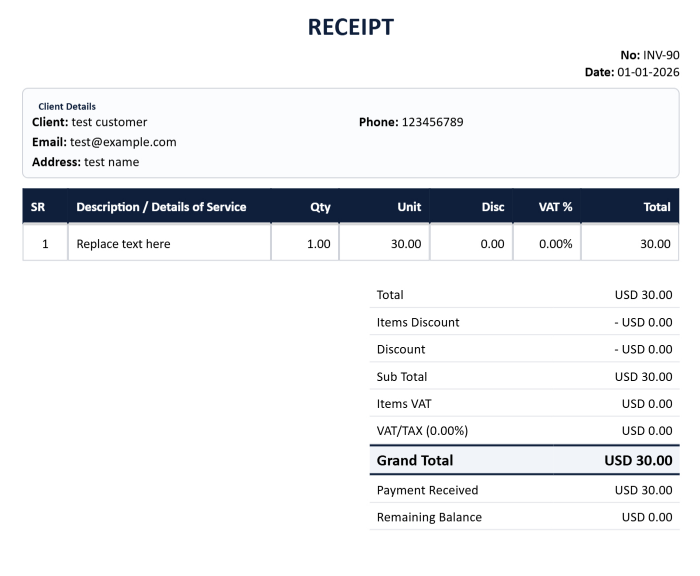
Payment Receipt Generator
Need to create a professional receipt for a payment?
The EZBZTools Payment Receipt Generator helps businesses, freelancers, consultants, contractors, landlords, service providers, and organizations create clear payment receipts online within minutes.
Add the payer’s details, payment amount, payment method, reference number, date, and notes, then generate a printable PDF receipt directly in your browser.
No signup required. Free and easy to use.
Create a Payment Receipt Online
A payment receipt confirms that money has been received.
It may be issued after payment by:
Cash
Bank transfer
Credit card
Debit card
Cheque
Mobile payment
Online transfer
Other payment methods
A professional receipt helps both the payer and the recipient maintain a clear record of the transaction.
Use the EZBZTools Payment Receipt Generator to prepare receipts for customers, tenants, clients, members, patients, students, suppliers, and other payers.
What Is a Payment Receipt?
A payment receipt is a document confirming that a person or organization has received money from another party.
It normally includes:
Receipt number
Payment date
Payer name
Recipient name
Amount received
Currency
Payment method
Payment reference
Purpose of payment
Outstanding balance, if applicable
Authorized signature
Company stamp
Notes
Payment receipts are commonly used for business transactions, service payments, rent, deposits, tuition fees, subscriptions, membership fees, and customer payments.
How To Use the Payment Receipt Generator
Enter your business or organization details.
Add the payer’s name and contact information.
Enter the payment date.
Add the amount received.
Select the payment method.
Add a payment reference or transaction number.
Describe what the payment was for.
Add notes, an authorized signature, or a company stamp.
Generate and download the printable PDF receipt.
The tool is designed to help you create a professional receipt quickly without installing software or creating an account.
Information To Include on a Payment Receipt
Receipt Number
Use a unique receipt number to identify and track the transaction.
Example:
PR-2026-00125
Payment Date
Record the date on which the payment was received.
Payer Details
Include the name of the customer, client, tenant, member, or other person making the payment.
Recipient Details
Add your business name, organization name, address, telephone number, email address, and registration details where relevant.
Amount Received
State the exact amount received and the currency.
Payment Method
Specify whether the payment was made by cash, bank transfer, card, cheque, or another method.
Payment Reference
Add a bank transaction number, cheque number, invoice number, or other useful reference.
Payment Purpose
Clearly explain what the payment relates to.
Examples:
Invoice payment
Rent payment
Service fee
Deposit
Subscription fee
Membership fee
Tuition fee
Instalment payment
Advance payment
Signature and Stamp
Where required, add an authorized signature and official company stamp.
Payment Receipt Example
Payment Receipt No.: PR-2026-00125
Payment Date: 10 July 2026
Received From: John Smith
Amount Received: $1,250.00
Payment Method: Bank Transfer
Reference Number: TXN-78452196
Payment For: Consulting services – Invoice INV-2026-0148
Balance Remaining: $0.00
Received By: ABC Consulting Services Ltd.
Authorized Signature: __________________
Company Stamp: __________________
This example shows the basic information normally included in a clear payment receipt.
Who Can Use This Payment Receipt Generator?
Small Businesses
Create receipts for customer payments, deposits, and invoice settlements.
Freelancers
Issue professional receipts after receiving payment from clients.
Consultants
Confirm payments for advisory, management, financial, technical, or professional services.
Contractors
Create receipts for project deposits, labour charges, progress payments, and final payments.
Landlords and Property Managers
Generate receipts for rent, security deposits, maintenance charges, and other property-related payments.
Schools and Training Providers
Issue receipts for tuition, registration fees, workshops, and training programmes.
Clinics and Healthcare Providers
Confirm administrative, consultation, or service payments where appropriate.
Membership Organizations
Create receipts for membership fees, subscriptions, and renewals.
Retailers and Service Providers
Provide customers with proof of payment for products and services.
Common Types of Payment Receipts
The EZBZTools Payment Receipt Generator can be used to create:
Cash payment receipts
Bank transfer receipts
Card payment receipts
Cheque payment receipts
Rent receipts
Deposit receipts
Advance payment receipts
Partial payment receipts
Full payment receipts
Service payment receipts
Membership fee receipts
Tuition fee receipts
Subscription receipts
Invoice payment receipts
Payment Receipt vs Invoice
A payment receipt and an invoice serve different purposes.
Invoice
An invoice requests payment.
It normally shows:
Amount due
Products or services supplied
Payment terms
Due date
Tax or VAT
Outstanding balance
Payment Receipt
A payment receipt confirms that payment has already been received.
It normally shows:
Amount received
Payment date
Payment method
Transaction reference
Purpose of payment
Remaining balance, if any
An invoice is issued before or when payment is requested. A receipt is usually issued after payment is received.
Payment Receipt vs Sales Receipt
A payment receipt confirms that money was received.
A sales receipt may also show the products or services sold, quantities, prices, taxes, discounts, and totals.
Payment receipts are particularly useful when confirming:
Invoice settlements
Deposits
Instalments
Rent payments
Service fees
Account payments
Partial Payment Receipts
A partial payment receipt should clearly show:
Total amount due
Amount received
Remaining balance
Payment date
Payment reference
Related invoice or contract number
Example:
Total Invoice Amount: $2,000
Payment Received: $750
Balance Remaining: $1,250
This prevents confusion and helps both parties maintain accurate records.
Common Payment Receipt Mistakes
Missing Receipt Number
Without a unique receipt number, it may be difficult to track or verify the payment later.
Unclear Payment Purpose
Always explain what the payment relates to, especially when the customer has multiple invoices or transactions.
Incorrect Amount or Currency
Check the amount and currency before issuing the receipt.
Missing Payment Method
Recording the payment method helps with bookkeeping and reconciliation.
No Transaction Reference
For bank, card, cheque, or online payments, add the transaction reference whenever available.
Missing Remaining Balance
For partial payments, clearly show the amount still outstanding.
Issuing a Receipt Before Payment
A receipt should generally confirm that money has actually been received.
Duplicate Receipt Numbers
Use a consistent numbering system and avoid issuing the same receipt number twice.
Why Professional Payment Receipts Matter
Proof of Payment
A receipt gives the payer evidence that the payment was made and received.
Better Recordkeeping
Receipts help businesses organize income records and reconcile transactions.
Customer Confidence
Professional documentation improves trust and reduces misunderstandings.
Easier Accounting
Clear payment details help accountants match receipts with invoices, bank entries, and customer accounts.
Dispute Prevention
A dated receipt with a payment reference can help resolve payment disputes.
Audit Support
Receipts may support internal reviews, financial reporting, and audit trails.
Benefits of Using EZBZTools
The EZBZTools Payment Receipt Generator offers:
Free online access
No signup required
Browser-based use
Printable PDF output
Payment method selection
Receipt number support
Payer and recipient details
Reference number fields
Notes and payment purpose
Signature support
Company stamp support
Fast receipt creation
You can create a professional receipt without using spreadsheet templates, word-processing software, or paid accounting applications.