
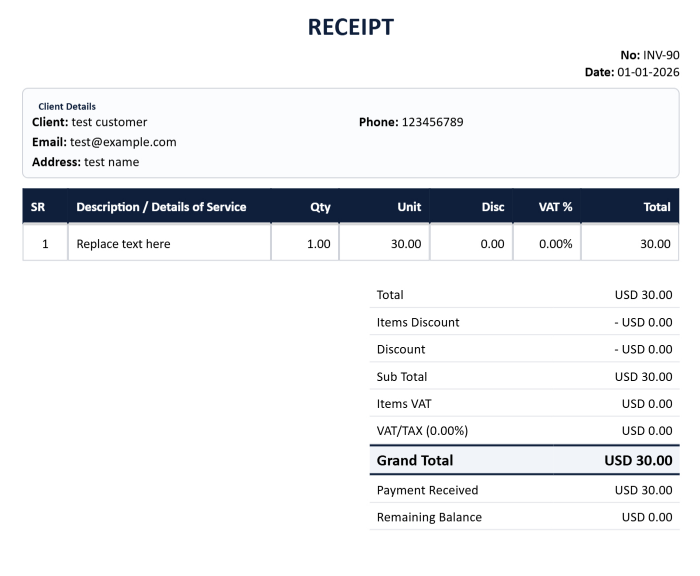
Create Professional Receipts Online for Free
The EZBZTools Receipt Generator helps businesses, freelancers, consultants, contractors, retailers, and service providers create professional receipts quickly and easily.
A receipt serves as proof of payment and provides both the customer and the business with an official record of a completed transaction. Whether you receive cash, bank transfers, card payments, or partial payments, issuing a professional receipt helps maintain accurate records and improves customer confidence.
With EZBZTools, you can create receipts online without installing software, creating an account, or paying subscription fees.
Simply enter your business details, customer information, payment information, and transaction details to generate a professional PDF receipt instantly.
What Is a Receipt?
A receipt is a document issued after payment has been received from a customer.
The purpose of a receipt is to confirm that payment was made and accepted by the seller or service provider.
A typical receipt includes:
- Business name
- Customer name
- Receipt number
- Receipt date
- Payment amount
- Payment method
- Description of goods or services
- Outstanding balance (if any)
- Authorized signature
Receipts are commonly used for accounting, bookkeeping, auditing, tax records, and customer reference.
Who Can Use This Receipt Generator?
The EZBZTools Receipt Generator is suitable for various industries and professions.
Freelancers
Freelancers can provide payment confirmations to clients after receiving payment.
Consultants
Consultants can issue receipts for professional services and advisory engagements.
Contractors
Construction and maintenance contractors can provide receipts for completed payments.
Retail Businesses
Retail stores can generate receipts for product sales.
Service Providers
Cleaning companies, designers, IT providers, trainers, and many other businesses can issue professional receipts.
Small Businesses
Small businesses can maintain proper financial records and improve professionalism by issuing receipts for all payments received.
Features of the EZBZTools Receipt Generator
Professional PDF Output
Generate clean and professional receipts ready for printing or emailing.
No Signup Required
Create receipts immediately without registration.
Customer Information
Add customer details for accurate transaction records.
Multiple Payment Methods
Record payments received through:
- Cash
- Bank Transfer
- Credit Card
- Debit Card
- Online Payments
- Cheque
Receipt Numbering
Assign receipt numbers for tracking and record keeping.
Outstanding Balance Tracking
Show remaining balances where applicable.
Printable Format
Download and print professional receipt documents.
Why Receipts Are Important
Receipts provide documented evidence that payment has been received.
Benefits include:
- Proof of payment
- Customer confidence
- Financial record keeping
- Tax documentation
- Audit support
- Dispute resolution
Businesses that consistently issue receipts often appear more professional and organized.
Information Required to Create a Receipt
Before generating a receipt, prepare the following information:
- Business Information
- Company Name
- Address
- Phone Number
Email Address
Customer Information
Customer Name
Company Name
Contact Details
Payment Information
Receipt Number
Receipt Date
Payment Method
Amount Received
Transaction Information
Description of Products
Description of Services
Invoice Reference Number (if applicable)
Types of Receipts You Can Create
Payment Receipts
Confirm customer payments for products or services.
Cash Receipts
Record payments received in cash.
Sales Receipts
Provide proof of product sales.
Service Receipts
Confirm payment for professional services.
Partial Payment Receipts
Record advance or installment payments.
Customer Payment Receipts
Link receipts to invoices and customer accounts.
Receipt vs Invoice
A receipt and an invoice serve different purposes.
Invoice
An invoice is issued before payment and requests payment from the customer.
Receipt
A receipt is issued after payment has been received and confirms the transaction.
Many businesses use both documents during the same transaction process.
Example:
- Quotation issued
- Customer approves quotation
- Invoice issued
- Customer pays
- Receipt issued
- This creates a complete and professional business record.
Benefits of Using an Online Receipt Generator
Compared to manually creating receipts in spreadsheets or word processors, an online receipt generator offers:
- Faster document creation
- Consistent formatting
- Better record keeping
- Professional appearance
- Reduced errors
- Improved customer communication
The EZBZTools Receipt Generator helps businesses save time while maintaining professional standards.
Create Your Receipt Today
The EZBZTools Receipt Generator allows you to create professional receipts in minutes.
No software installation.
No account creation.
No subscription fees.
Simply enter your payment details, generate your receipt, and download a professional PDF document ready for printing or sharing.